🔍

DAM Audit Webinar

Learn how to clean, organize, and optimize your DAM portal.
Question

Updating asset metadata via API

  • November 11, 2025
  • 4 replies
  • 45 views

Hello,

I am having a hard time using the Bynder API to update asset metaproperties, and I’m unsure what the issue is. I followed this “tell me more” page which seems to suggest this is possible, but doesn’t give more detail specifically for metaproperties:


I’m making a POST request to {my_bynder_address}/api/v4/media/{asset_id}, and I have confirmed I have correct authorization and a valid asset ID. When I make a GET request to this endpoint I successfully retrieve asset data.

However, when I switch to a POST request and include my JSON body for the asset data update, nothing happens. I receive a “{"message":"Accepted","statuscode":202}” response, but the asset is never updated. Checking through the UI or the API both show unchanged metaproperties on the asset. Note that these metaproperties are strings, they do not have options associated with them. I have tried formatting my request’s JSON body both like {“metaproperty_name” : “value”} and {“metaproperty”: {“metaproperty_name” : “value”}}. Both yield a 202 response and yet no update is made. 

Any idea on what is happening here?

4 replies

Ryanne Perry
Community Manager
Forum|alt.badge.img+1
  • Community Manager
  • November 12, 2025

Hi ​@dbessy! Thank you for taking the time to ask your question and for your patience here. I am checking internally to see how best to support you.


Ryanne Perry
Community Manager
Forum|alt.badge.img+1
  • Community Manager
  • November 13, 2025

Hi ​@dbessy it could be two things:

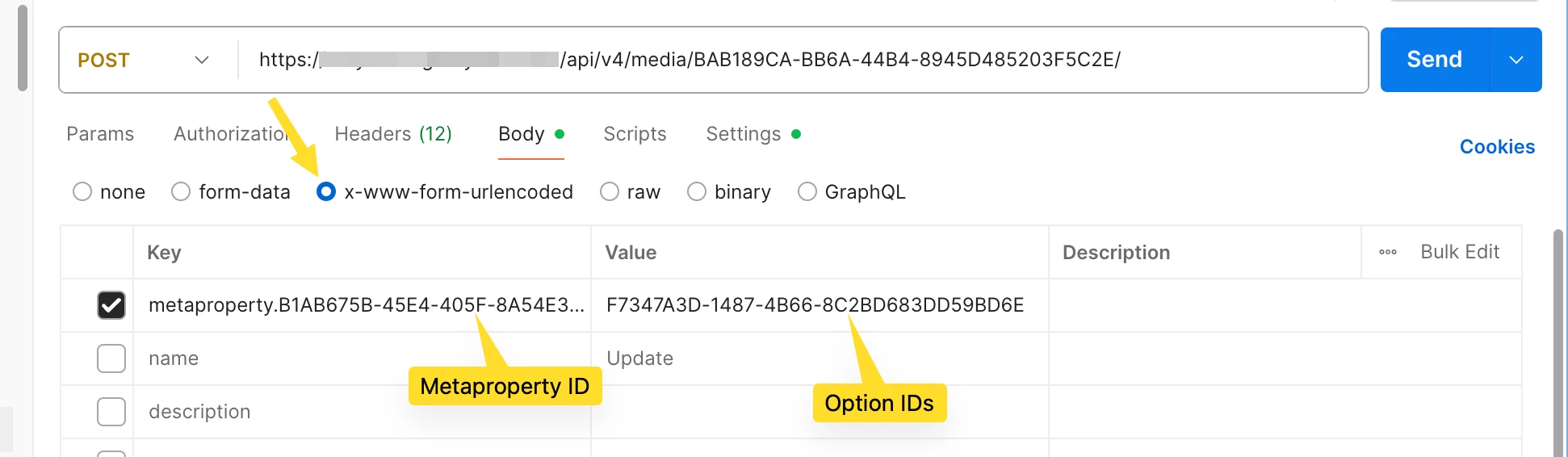
  1. The body of the POST call needs to be in x-www-form-urlencoded format, not JSON (screenshot of Postman below)
  2. For the metaproperty updates, the format is to have the metaproperty ID as the key and the option ID as the value (also in the screenshot below)
  3.  


  • Author
  • Newbie
  • November 13, 2025

Ah, got it! I actually had the encoding right, but I did not know that the keys needed to be in “metaproperty.id” format. Everything works now as expected, thanks for your help!

I think some of my confusion may have stemmed from looking at the wrong documentation, is Apiary the correct place to go for documentation still? The introduction section says it’s being deprecated and developers.bynder.com points to https://bynder-api-documentation.readme.io, which is what I was using. It seems like it’s missing some really essential details that Apiary has, though. 


Ryanne Perry
Community Manager
Forum|alt.badge.img+1
  • Community Manager
  • November 17, 2025

Thank you for flagging that ​@dbessy! I will share this with the documentation team to update necessary info.